What is a digital vehicle inspection?
A digital vehicle inspection (DVI) is a standard health check carried out on every car that comes into the garage, with the results recorded digitally and shared with the customer. Instead of a mechanic's verbal summary, the customer receives a short report:
- Every item checked, marked green, amber or red
- Photos (and sometimes short videos) of anything that needs attention
- A short note and a price for each recommended job
- A simple way to approve or decline each item
The inspection itself is not new. Good garages have always looked over the car. What changes is that the findings become visible, consistent and easy to act on.
Why customers say no to recommended work
Independent garages lose a lot of approved work to the same few problems:
- The customer cannot see the problem. They are at work, the car is on a ramp, and the only information is a phone call.
- It sounds like an upsell. Without evidence, extra work can feel like the garage is trying to raise the bill.
- Everything sounds equally urgent. If brake pads and a small windscreen chip are mentioned in the same breath, the customer cannot tell what really matters.
- There is no record. If the customer says "not today", nobody remembers to mention it again before the next service or NCT.
- Every mechanic explains it differently. One technician writes detailed notes, another writes "front end noisy". Customers notice the difference.
A digital inspection solves all five: it shows the problem, separates urgent from non-urgent, and leaves a record for next time.
What red, amber and green mean
The red–amber–green (RAG) system is widely used in UK and Irish garages because customers understand it at a glance.
Green: OK
Checked and in good condition. No action needed. Showing the green items matters too, because it proves the car was properly checked.
Amber: needs attention soon
Not dangerous today, but likely to need work in the coming months. For example, tyres at 3 mm, a weak battery or a worn suspension bush.
Red: needs attention now
A safety issue, a legal issue or something likely to cause a failure soon. For example, brake pads at 2 mm, a blown brake light or tyres close to the legal limit.
Be honest with the colours. If everything is marked red, customers stop trusting the report. If real problems are marked green to avoid an awkward conversation, the garage takes the risk.
What to check: a 21-point vehicle health check
The free checklist groups 21 checks into five areas, so the technician follows the same order on every car.
| Area | Checks |
|---|---|
| Under the bonnet | Engine oil, coolant, brake fluid, battery test and terminals, auxiliary belt, visible leaks |
| Exterior and visibility | Lights and indicators, wiper blades and washers, windscreen chips and cracks |
| Tyres and brakes | Front and rear tyre tread depth and condition, front brakes, rear brakes |
| Underneath the vehicle | Exhaust, shock absorbers and springs, steering and suspension joints, CV boots, underbody corrosion |
| Interior | Dashboard warning lights, horn, seat belts and mirrors, heater, demister and air conditioning |
Record tyre tread depth in millimetres for each axle. The legal minimum in Ireland and across the EU is 1.6 mm, but many garages mark tyres amber well before that, so the customer can plan the cost.
How a digital inspection works, step by step
- Check the car in. Open a job card with the customer's details, registration, mileage and the work they booked.
- Run the same checklist on every car. Follow the 21 points in order, so nothing is missed and every technician works the same way.
- Mark each item green, amber or red. Add a short, plain-English note for every amber and red item.
- Take photos of every amber and red item. Show the worn pad next to a new one, the tread gauge in the tyre, the split boot, the corroded terminal. Number the photos so they match the checklist.
- Add a price for each recommended job. Customers decide faster when they see "Front pads and discs: €289" than when they hear "it'll be a few hundred".
- Send the report while the car is still on the ramp. Text or email a link with the results and photos, then follow with a quick call for red items.
- Record what was approved. Mark each item Yes, No or Later, so the final invoice matches and nothing is forgotten.
- Set reminders for everything not approved. Every amber item and every "Later" answer becomes a dated reminder.
Sample: a completed health check for a Volkswagen Golf
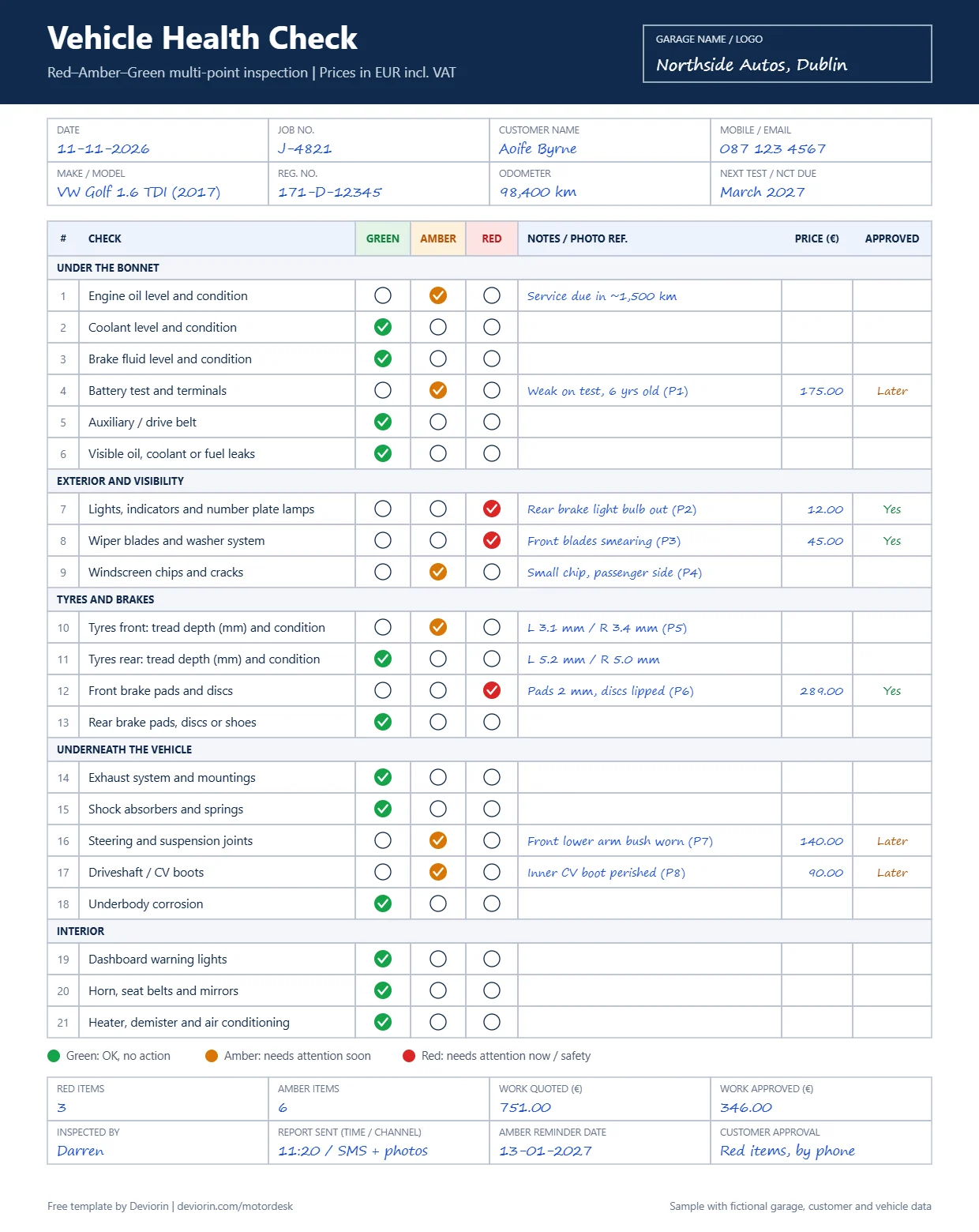
A 2017 Golf came in for a service. The health check found:
| Result | Items | Quoted | Decision |
|---|---|---|---|
| Red | Rear brake light bulb, front wiper blades, front brake pads and discs | €346.00 | Approved by phone |
| Amber | Battery, front lower arm bush, inner CV boot | €405.00 | Not today; reminder set for January |
| Amber (no price yet) | Oil due in about 1,500 km, windscreen chip, front tyres at 3.1 / 3.4 mm | — | Noted for next visit |
| Green | 12 items | — | No action needed |
The customer approved €346 of extra work in one phone call, because the photos made the red items obvious. The €405 of amber work is not lost either: it has a reminder date and photo evidence for the next conversation, and it lines up with the car's next NCT.
Sending the report: what to say
Keep the message short and let the report do the work.
Turn amber items into future bookings
Amber items are some of the most valuable information a garage has, because they tell you what the customer will need next. Most garages lose them because they live in a mechanic's memory.
- Give every amber item a reminder date. Usually four to twelve weeks, or before the next service or NCT.
- Mention the photo. "The bush we showed you in November" is far more convincing than a generic service reminder.
- Group items for one visit. Battery, bush and CV boot together make a worthwhile booking for the customer and the garage.
- Use the NCT as a natural deadline. In Ireland, many amber items, such as tyres, lights and suspension wear, are also things that can cause an NCT failure.
Combined with simple booking and reminders, a consistent health check turns one service visit into a steady flow of planned work.
Best practice for photos and records
- One photo per finding, clearly framed. Show the part, not the whole engine bay.
- Use a reference. A tread gauge in the tyre, a new pad next to the old one, a torch on the split boot.
- Keep it clean. Avoid capturing personal items inside the car, and store photos securely with the job record.
- Be consistent. Agree what counts as amber and red for common items, such as tyres, pads and batteries, so every technician marks them the same way.
- Keep the record. Store the report with the vehicle history. It protects the garage if a customer later says they were never told.
- Respect consent for marketing. Service reminders about recommended work are part of the service, but promotional messages should only go to customers who have agreed to receive them.
Download the free red–amber–green checklist
Use the PDF when you want a printed checklist on a clipboard for each car. Use the Excel file when you want Green/Amber/Red and Yes/No/Later dropdowns, automatic counts, totals for quoted and approved work, and the approval rate for each job.
Send photo health checks and reminders from one system.
See how MotorDesk keeps job cards, inspection results, vehicle history and customer reminders together, so every amber item becomes a future booking.
Paper checklist or software?
A paper or Excel checklist is a strong start, and many garages see better conversations with customers from the first week. As the garage gets busier, the limits show:
- Photos live on a technician's phone, not with the job.
- Sending a report means typing a message and attaching photos by hand.
- Amber items are hard to find again when it is time to remind the customer.
- There is no easy way to see which technicians and which types of work get the most approvals.
How MotorDesk supports digital inspections
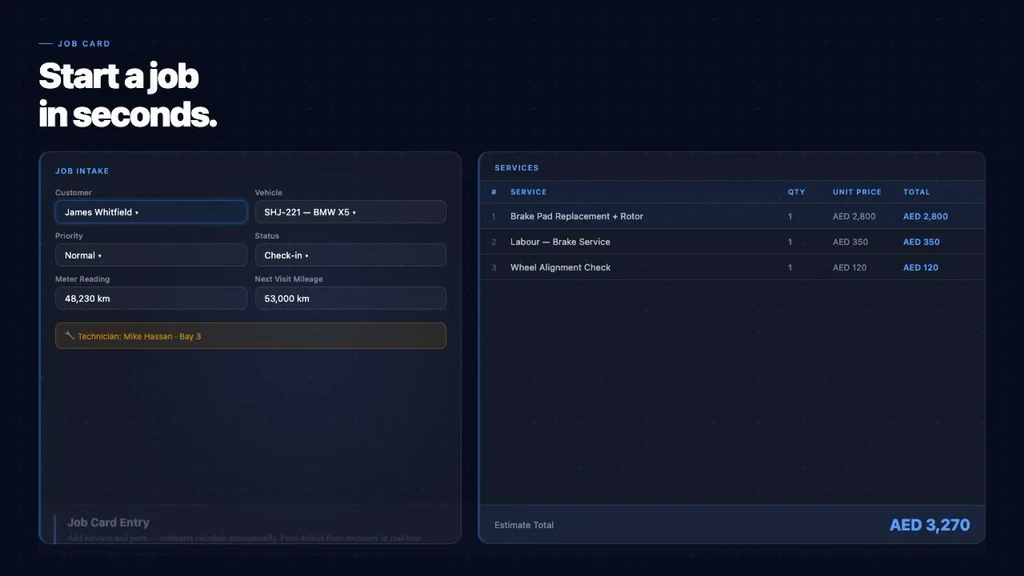
MotorDesk is Deviorin's garage management software. Each job card holds the customer, the vehicle, the work booked and the work recommended, so inspection results stay with the vehicle history instead of on a phone.
When the car comes back, the team can see what was recommended last time and what the customer decided, and customer reminders can be sent when the work is due.
FAQ
What is a digital vehicle inspection?
expand_more
It is a standard health check carried out on every car, with each item marked green, amber or red, photos of anything that needs attention, and a report sent to the customer for approval.
Does a digital inspection replace the NCT?
expand_more
No. The NCT is the official roadworthiness test in Ireland. A garage health check is a service the garage offers, and it can help customers prepare for the NCT by catching issues such as worn tyres, lights or suspension parts early.
What tread depth should I mark as amber or red?
expand_more
The legal minimum in Ireland and the EU is 1.6 mm. Many garages mark tyres red when they are close to that limit and amber at around 3 mm, so the customer can plan the replacement. Agree a rule for your garage and apply it consistently.
How long does a health check take?
expand_more
A 21-point visual check usually fits into a normal service slot. Taking photos and sending the report adds a few minutes, which is quickly recovered when one recommended job is approved.
Will customers think it is just an upsell?
expand_more
Not when it is honest and consistent. Showing green items as well as red ones, using photos, and explaining what can wait helps customers see the report as advice, not pressure.
Can I use this checklist outside Ireland?
expand_more
Yes. The checks work for any independent garage in Europe. Replace "NCT" with your local periodic test and adjust prices and VAT to your country.
Send photo health checks and reminders from one system.
See how MotorDesk keeps job cards, inspection results, vehicle history and customer reminders together, so every amber item becomes a future booking.