What is a job card in a car workshop?
A job card is the main repair record for a vehicle inside a workshop. It starts when a customer brings in a car and explains what the customer complained about, what the advisor inspected, what work is approved, which parts are used, which mechanic is assigned, and what the customer has to pay.
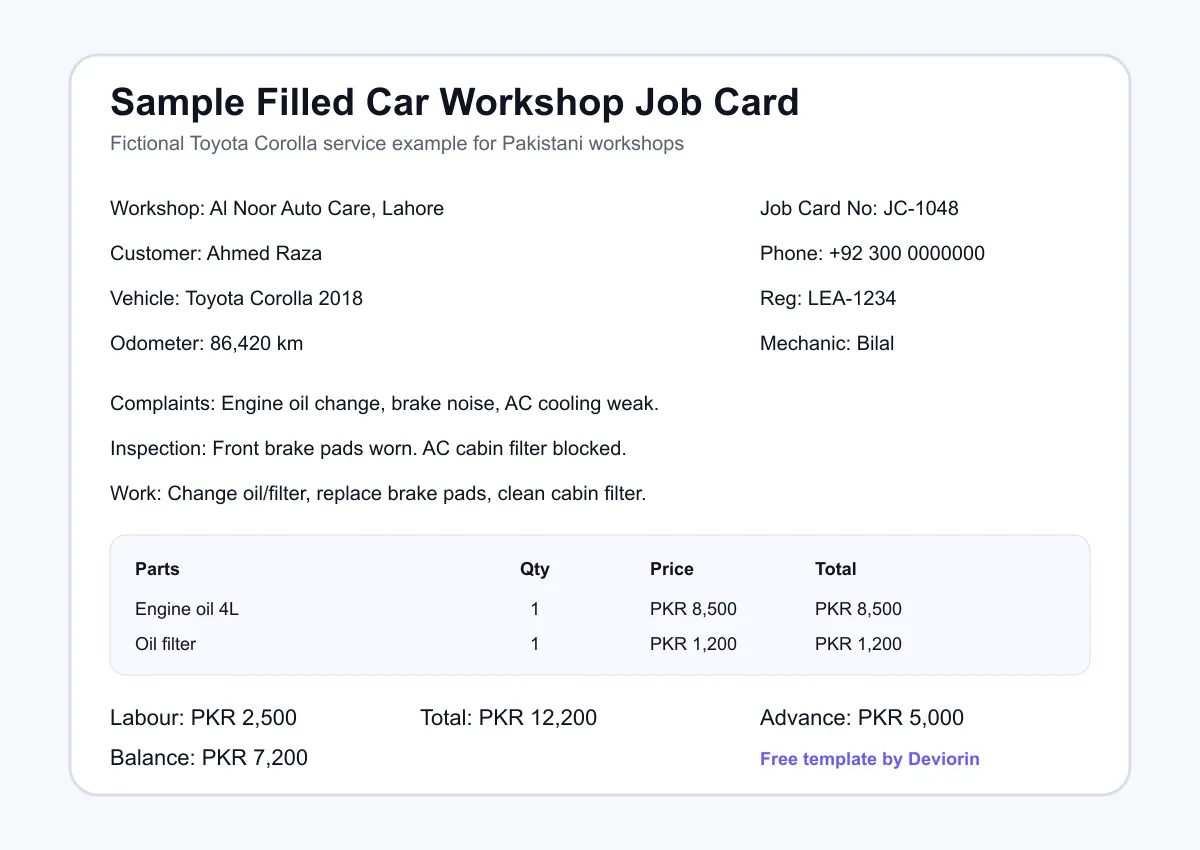
For example, a customer may bring a Toyota Corolla to a workshop in Lahore and say the brakes make noise and the AC is weak. The job card should record those complaints in clear words before the car goes to the mechanic. Later, the same card can show that brake pads, engine oil and an AC filter were checked, quoted and billed in PKR.
A good job card protects both sides. The customer knows what the workshop accepted. The workshop knows what was promised, who handled the job, and which parts or labour were used.
Why workshops lose money without proper job cards
Many workshops still run on memory, WhatsApp messages, rough paper notes and verbal instructions. This works for a few cars, but it becomes risky when several Suzuki, Honda and Toyota vehicles are parked at the same time and customers are asking for updates throughout the day.
Forgotten work is the first problem. A customer asks for an oil change, brake check and AC inspection, but only the oil change is written down. When the customer returns, the team has to explain why the other work was missed. Sometimes the workshop loses the labour charge. Sometimes it loses the customer.
Billing disputes are the second problem. If parts and labour are not written clearly, a customer can ask why the invoice includes a filter, plug set or brake pad replacement. A signed job card gives the service advisor a clear record to discuss.
The third problem is missing repair history. When the same car returns after two months, the workshop may not remember what was changed last time. Without a record, it is harder to diagnose repeat problems or remind the customer about upcoming service.
The fourth problem is mechanic tracking. If work is assigned verbally, management cannot easily see who worked on which vehicle, what was delayed, and where quality issues started.
What to include in a car workshop job card
A job card does not need to be complicated. It needs to capture the information your team uses every day. Use this checklist when creating a paper, Excel or digital job card for your workshop.
The important point is consistency. If every vehicle has the same fields, your advisor, cashier and mechanic can understand the repair status without asking the same questions again. It also makes it easier to move from paper to a digital platform like MotorDesk later.
Sample filled job card, with a fictional Toyota Corolla service
The example below shows how a workshop might fill a job card for a Toyota Corolla service. The customer, phone number and vehicle details are fictional. The goal is to show the level of detail that makes the job easier to manage.
Download the free job card template
Use the PDF when you want a simple A4 printable job card for reception or service advisor desks. Use the Excel file when you want a fillable sheet with formulas for parts subtotal, labour, total, advance and balance due.
Manage job cards, billing and spare parts in one place.
See MotorDesk in action and learn how a digital workflow can help your workshop keep customer, vehicle, parts and payment records together.
Problems with paper job cards
Paper job cards are a useful starting point, but they create problems as the workshop grows. A card can be lost, damaged by oil or water, or left inside a vehicle. Handwriting can be difficult to read, especially when several people add notes during the same job.
Paper is also not searchable. If a customer sends a WhatsApp message asking what was changed on his Honda Civic six months ago, the team may need to search files manually. Paper also does not create service reminders, customer history, mechanic reports or inventory links automatically.
How MotorDesk handles job cards digitally
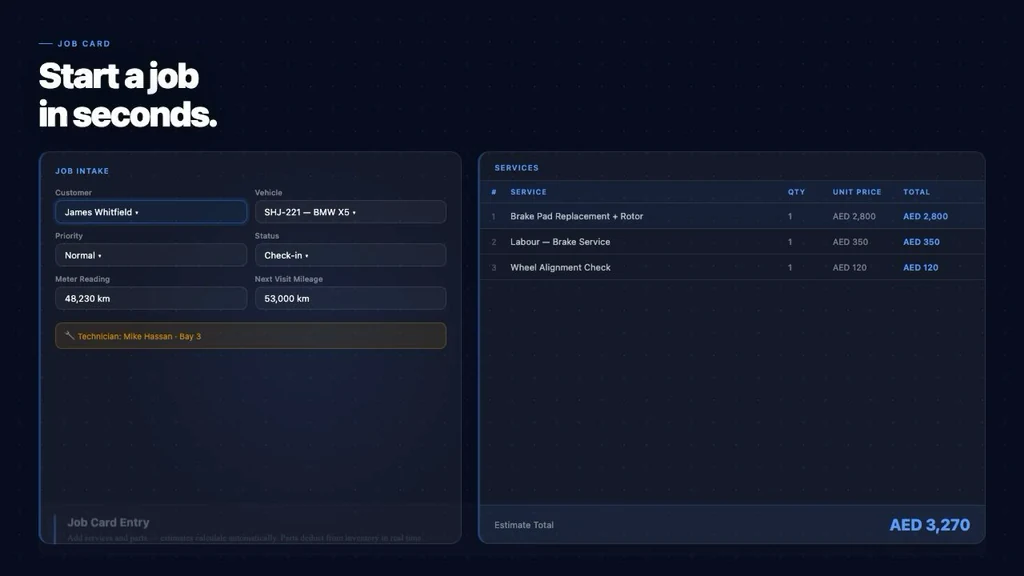
MotorDesk is built to help workshops manage job cards, billing, spare parts and customer history in one place. Instead of writing the same information on paper, a service advisor can create a digital job card, add customer complaints, assign a mechanic, attach parts, update status and connect the work to billing.
Digital job cards also make vehicle history easier to review. When a Suzuki Alto, Toyota Corolla or Honda City returns, the team can check previous jobs, parts used, invoices, payments and follow-ups. This makes the workshop look more organized and helps staff answer customer questions faster.

FAQ
Is a job card the same as an invoice?
expand_more
No. A job card records the work request, inspection, parts, mechanic assignment and approval. An invoice is the final billing document. A workshop can use the job card to prepare a more accurate invoice.
Should the customer sign the job card?
expand_more
Yes, whenever possible. A signature helps confirm the customer complaints, approved work and agreed estimate. It also reduces confusion if a billing dispute comes later.
How long should a workshop keep job cards?
expand_more
A workshop should keep job cards long enough to review service history, repeat complaints, warranty questions and payment records. The exact period depends on the workshop policy, accountant advice and local business requirements.
Can I make job cards on my phone?
expand_more
Yes. A small workshop can start with a printable or spreadsheet template. As the workshop grows, a digital system like MotorDesk is easier because records become searchable and linked to customer history.
What should I write in customer complaints?
expand_more
Write the customer words clearly, such as “brake noise when reversing” or “AC cooling weak after 20 minutes.” Clear complaints help the mechanic inspect the right issue and help the advisor explain the repair.
Manage job cards, billing and spare parts in one place.
See MotorDesk in action and learn how a digital workflow can help your workshop keep customer, vehicle, parts and payment records together.