Create structured job cards
MotorDesk includes digital job cards for customer and vehicle details, assigned work, technician context, pricing and estimated totals. The job card becomes a structured workshop record instead of a loose note.
MotorDesk helps workshops create digital job cards, assign technician context, track status and connect the work to invoices and payment visibility.
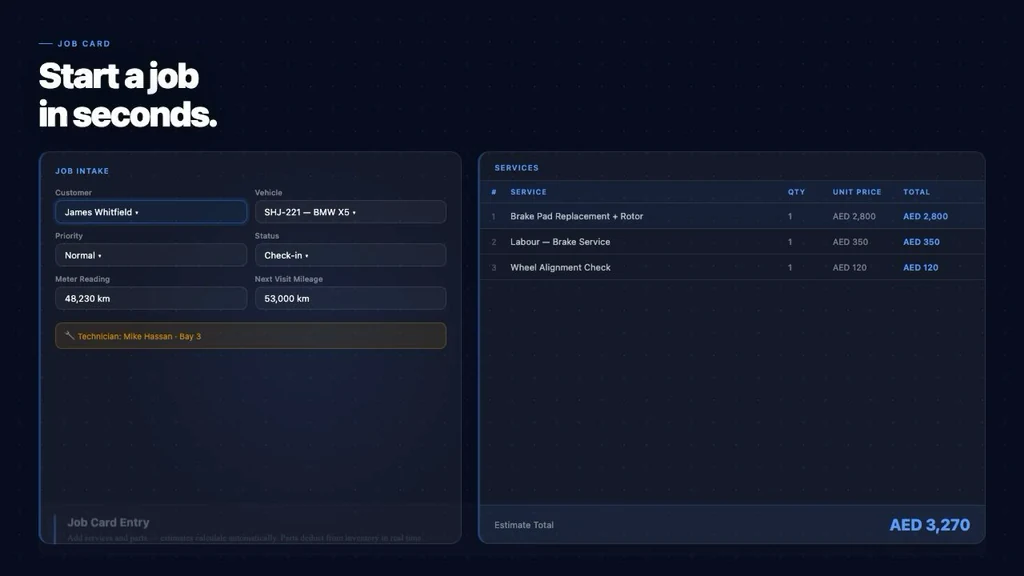
A job card is the operating record for a workshop visit. If it is incomplete, hard to read or separated from the customer and vehicle history, the whole service flow becomes harder to control. A service advisor may know what the customer requested, a technician may know what was inspected, and the owner may know what should be billed, but the information is not always in one place.
Paper job cards also make status tracking difficult. A vehicle may be checked in, waiting for inspection, in progress, ready for invoice or completed, but that status can be known only by the person holding the paper. When the front desk receives a customer call, they have to ask around before giving an update.
Job card software for workshops should make the job record useful from the first booking through completion. It should connect customer details, vehicle details, assigned work, technician context, estimated totals, invoice details and final payment status.
MotorDesk includes digital job cards for customer and vehicle details, assigned work, technician context, pricing and estimated totals. The job card becomes a structured workshop record instead of a loose note.
Because MotorDesk organises customers and vehicles alongside bookings and jobs, the team can keep service context with the right customer and vehicle. This is useful when customers return for repeat work or ask about past visits.
The owner has confirmed that MotorDesk supports assigning technicians to jobs. This gives the workshop a clearer view of who owns the work and helps managers understand workload.
MotorDesk includes a workflow view showing vehicles moving through Check-In, In Progress, Ready and Completed states. That helps service advisors answer customer questions and helps owners monitor the day.
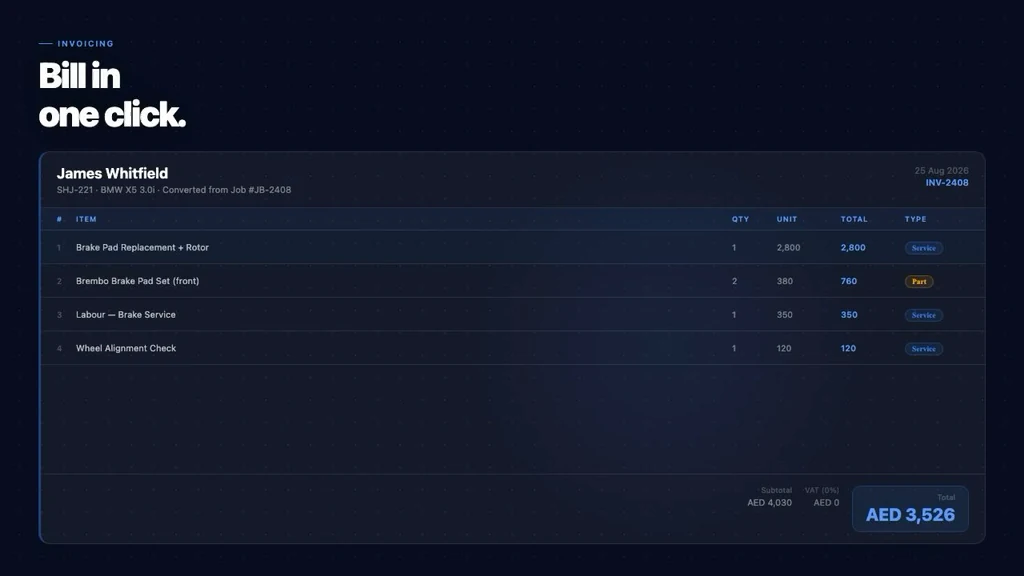
MotorDesk includes invoicing for services, parts, labour, quantities, rates, totals and invoice summaries. The goal is to reduce the gap between completed work and accurate billing.
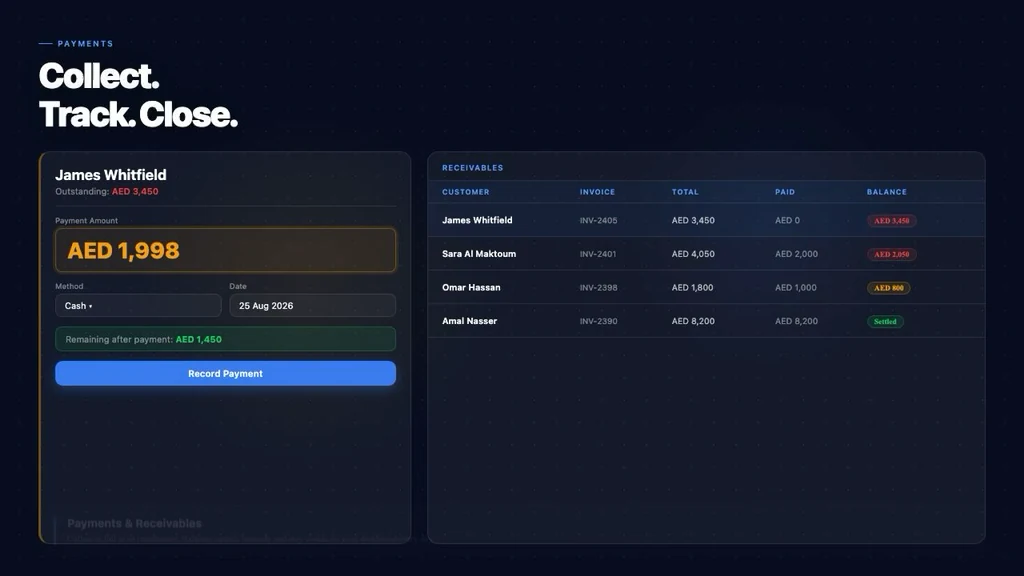
The existing MotorDesk screenshots show job cards, pipeline, invoice and payments screenshots. A workshop can use the demo to compare MotorDesk against its current paper or spreadsheet process.
Workshops that still use printed job cards
Garages that need technician assignment visibility
Service advisors who answer frequent customer status calls
Owners who want job, invoice and payment records connected
A useful demo should start with the way your workshop already works: how bookings arrive, who creates job cards, how technicians receive work, where invoices are prepared and how customers are reminded after service. MotorDesk can then be reviewed against that real workflow instead of a generic software checklist.
Job card software helps a workshop create digital job records for customer details, vehicle details, assigned work, technician context, pricing and job status.
Yes. The owner has confirmed that MotorDesk supports assigning technicians to jobs.
Yes. MotorDesk job cards can include pricing and estimated totals as part of the job record.
MotorDesk includes invoicing for services, parts, labour, quantities, rates, totals and invoice summaries, so completed work can be reflected in billing.
Yes. MotorDesk includes a workflow view with states such as Check-In, In Progress, Ready and Completed.
Yes. Even a small workshop benefits when customer, vehicle, assigned work, status and invoice details are organised in one place.
Share how your workshop handles bookings, job cards, WhatsApp follow-ups, invoices and payments today. The demo can map MotorDesk around that workflow.