Use spreadsheets for simple lists
A spreadsheet can still be useful for exports, simple planning or one-off analysis. It is less useful as the live place where every booking, job card, invoice and customer follow-up is managed.
A practical comparison for workshop owners deciding whether spreadsheets are still enough or whether a connected system like MotorDesk is a better fit.
Excel and Google Sheets are useful when a workshop is small and the owner needs a quick list. They can hold customer names, vehicle plates, invoice notes and payment status. The problem starts when the spreadsheet becomes the main operating system for the workshop. One person edits a row, another person keeps a separate copy, a technician waits for details, and nobody is fully sure whether the latest status is accurate.
A car workshop has moving work: bookings, check-ins, jobs, technician assignments, parts, invoices, payments and follow-ups. A spreadsheet can record some of that information, but it does not naturally guide the team from one stage to the next. It also does not behave like a booking desk, a job card system, an invoice view, a payments view and an inventory record at the same time.
The right answer is not always to remove spreadsheets immediately. The honest question is whether the spreadsheet still gives the owner control. If it creates extra checking, repeated data entry and missed follow-ups, workshop software may be a better operating base.
A spreadsheet can still be useful for exports, simple planning or one-off analysis. It is less useful as the live place where every booking, job card, invoice and customer follow-up is managed.
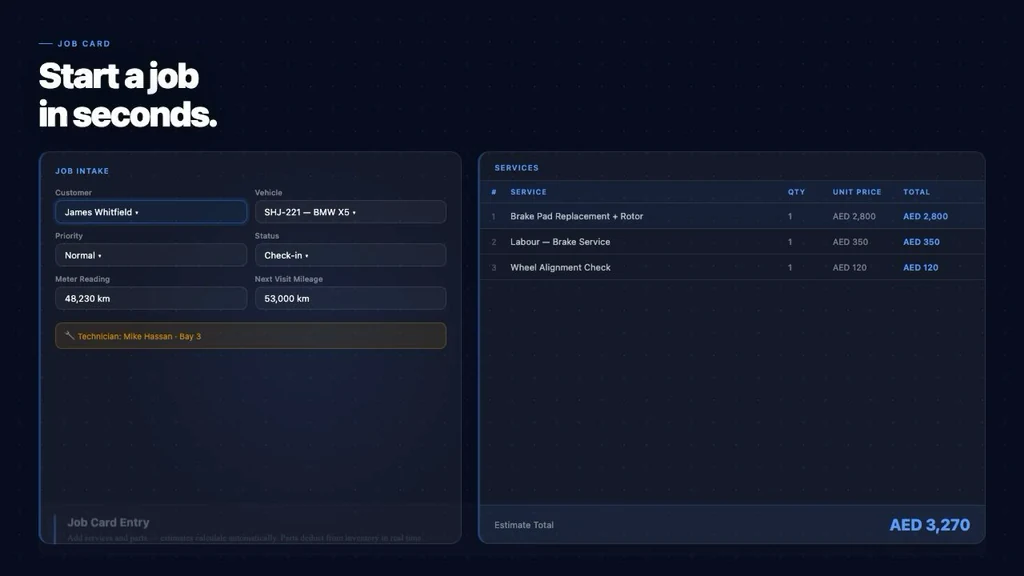
MotorDesk connects bookings, customers, vehicles, digital job cards, workflow status, invoices, payments and inventory. That gives the workshop a live workflow instead of a static table.
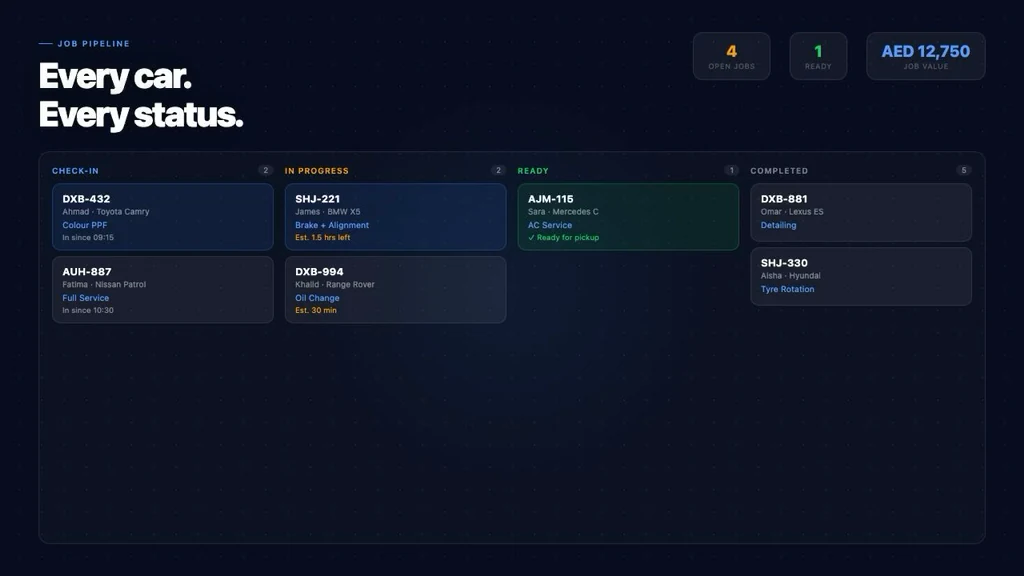
MotorDesk includes a workflow view that shows vehicles moving through Check-In, In Progress, Ready and Completed states. A spreadsheet usually needs someone to keep updating and explaining those statuses.
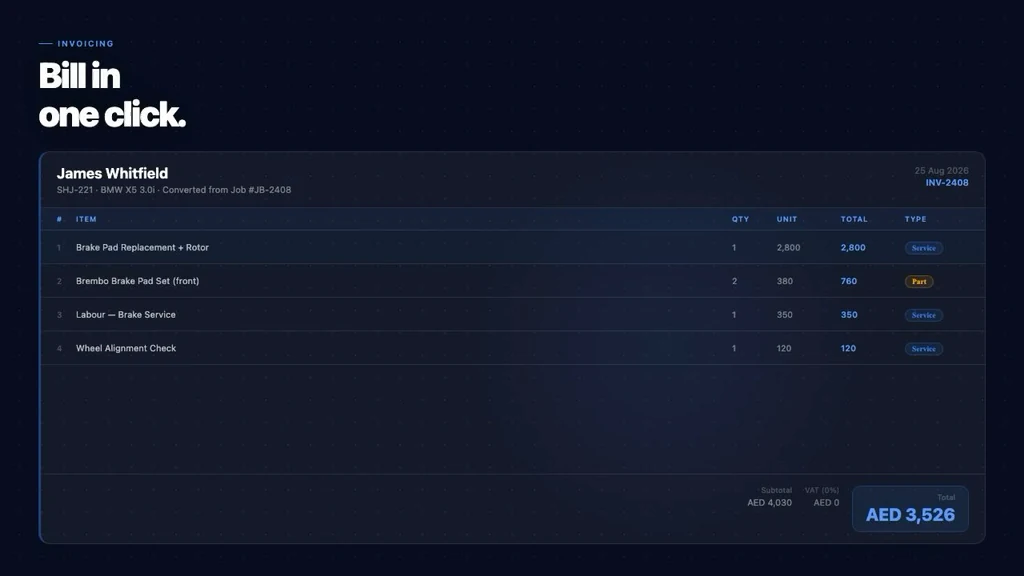
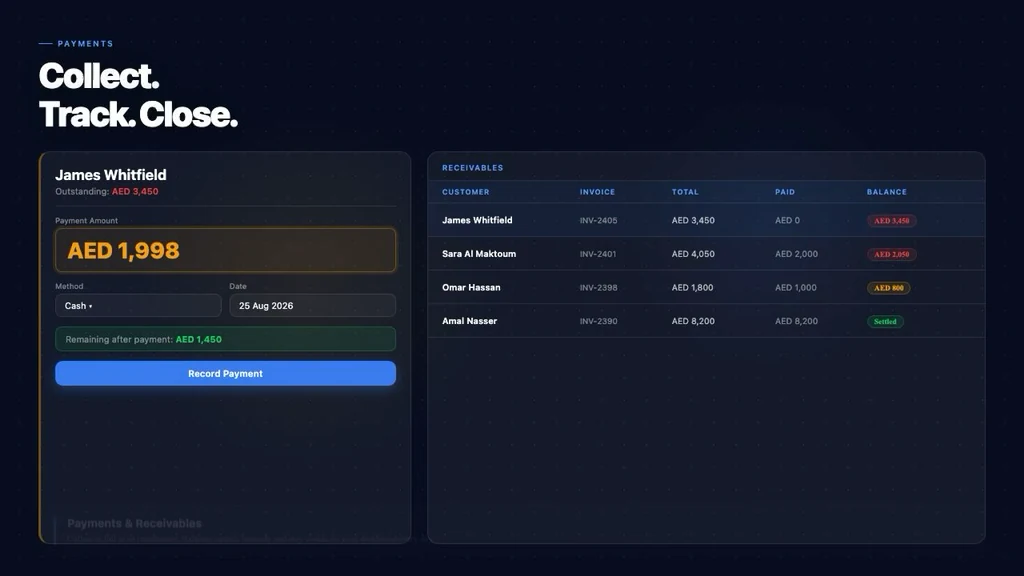
MotorDesk includes invoicing plus payments and receivables views. This helps the workshop connect completed jobs with billing and outstanding balances.
The owner has confirmed MotorDesk sends automatic WhatsApp service reminders. A spreadsheet can store a date, but it does not give the same reminder workflow on its own.
The best way to decide is to map the current spreadsheet columns against MotorDesk screens: booking, job card, pipeline, invoice, payments and inventory.
Owners using spreadsheets as the main workshop system
Service advisors repeating the same data across files
Garages missing service follow-ups
Workshops that want live job and payment visibility
A useful demo should start with the way your workshop already works: how bookings arrive, who creates job cards, how technicians receive work, where invoices are prepared and how customers are reminded after service. MotorDesk can then be reviewed against that real workflow instead of a generic software checklist.
Excel can work for simple lists, but it becomes harder when the workshop needs connected bookings, job cards, status tracking, invoices, payments and reminders.
MotorDesk connects bookings, customers, vehicles, digital job cards, workflow status, invoices, payments, inventory and automatic WhatsApp service reminders.
The current codebase does not verify export features, so this should be confirmed with the owner during the demo.
A workshop should consider software when spreadsheets cause repeated data entry, unclear job status, missed follow-ups or poor visibility over invoices and payments.
MotorDesk includes payments and receivables views for paid amounts, outstanding balances, payment status and collection visibility.
Not necessarily. MotorDesk can become the operating system for workshop work, while spreadsheets may still be useful for simple exports or planning.
Share how your workshop handles bookings, job cards, WhatsApp follow-ups, invoices and payments today. The demo can map MotorDesk around that workflow.